Today’s pickups and returns
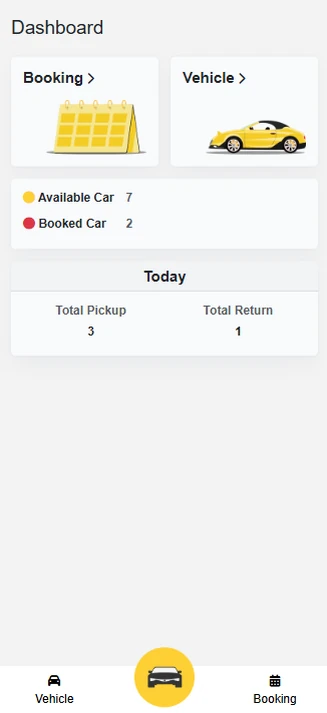
What goes out and what comes back today, the moment staff open the app.
Aurora Car RentalCar Rental · Booking System
A booking system Aurora’s staff run from their phones: bookings, pickups and returns, and which cars are free for the next customer.
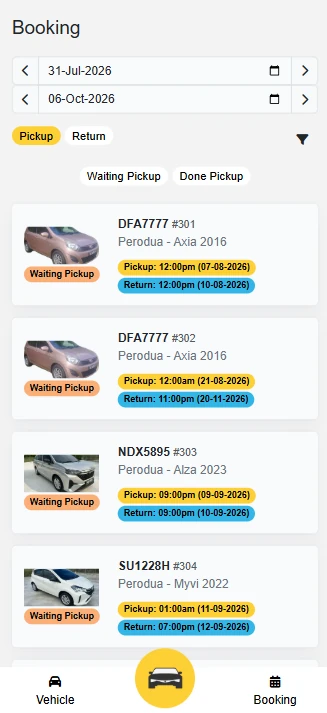
Potadot built a booking system for Aurora Car Rental that staff run from their phones. They see today’s pickups and returns at a glance, filter bookings by date and status, open any booking for the customer’s details and remarks, and check which cars are available, rented out, on contract or out of service. A new booking takes a few taps, with the customer’s IC photo uploaded on the spot.
A rental fleet moves all day: cars are picked up, returned, sent for service and booked weeks ahead. Aurora’s staff needed one place to see what is going out today, what is coming back, and which car is free for the next customer.
What goes out and what comes back today, the moment staff open the app.
Any date range, split into pickups and returns, waiting or done.
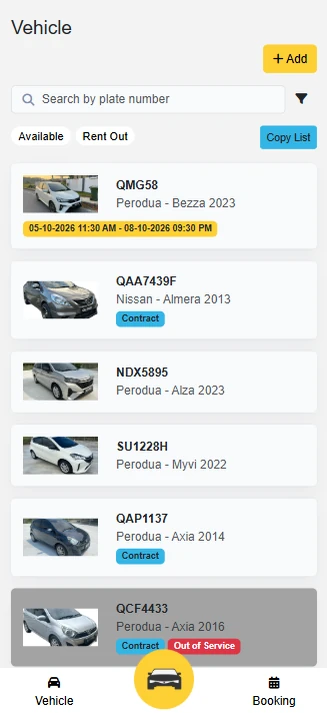
Available, rented out, on contract or out of service, with the booked dates on each car.
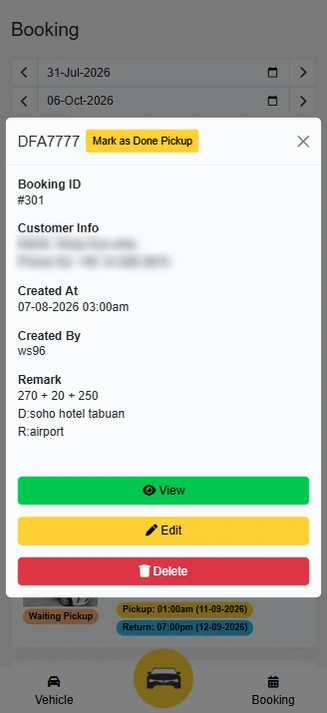
Customer details, IC photo and remarks taken from a phone at the counter or in the car park.
Scroll through the screens Aurora’s staff use every day. The highlight shows what to look at on each one.
Available and booked cars, plus today’s total pickups and returns, the moment staff open the app.
Pick a date range, switch between pickup and return, and filter waiting or done. Each booking shows the car, plate, booking number and both times.
Customer details, who created it and when, and remarks like the hotel or airport. Staff mark the car as picked up, or view, edit or delete the booking.
Search by plate number and switch between available and rented out. Cars on contract or out of service are flagged, and booked dates show on the card.
Pick the car, enter the customer’s name, IC number and phone, upload a photo of their IC and add a remark.
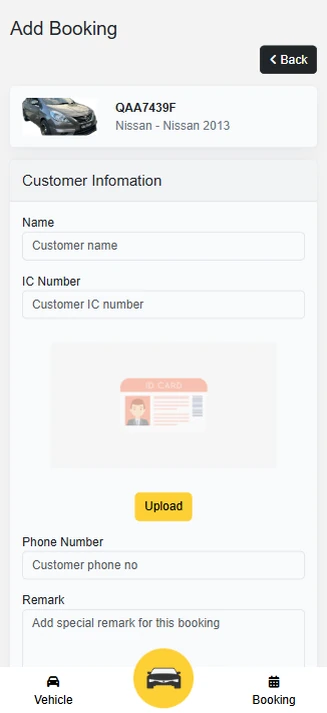 Today’s pickupsWaiting pickupMark as picked upBooked datesIC upload
Every module was designed around how Aurora Car Rental already worked, then connected so data is entered once.
Available and booked cars, today’s pickups and returns.
Bookings by date range, with pickup and return times.
Waiting and done status, marked in one tap.
Every car with plate, model, year and photo.
Available or rented out, searchable by plate number.
Cars on contract or out of service, flagged.
Name, IC number, phone and an IC photo per booking.
Remarks, who created each booking and when.
See today’s pickups and returns the moment they open the app
Every booking in one list, by date and status
Mark a car as picked up in one tap
Pickup and return status kept up to date
Find any car by plate number
Know which cars are free, rented out, on contract or in service
Take a booking with the customer’s IC on the spot
Customer details, IC and remarks kept with each booking
Swipe or drag to scroll · tap a screen to enlarge
Every Potadot project starts by understanding the client's situation before anything is designed. See all seven steps
Mapped how Aurora takes bookings, hands over cars and tracks returns.
Every screen built for staff working on the move, one hand free.
Booking, vehicle and customer modules, with working demos along the way.
Training for the team, launch, then ongoing support.
Have a similar situation? Tell us how your business runs today on WhatsApp at +6011-1142 1029.
A booking system for the staff, built for the phone. It covers a dashboard of available and booked cars with today’s pickups and returns, bookings by date with pickup and return status, booking details with customer info and remarks, vehicle management with availability, contract and out-of-service flags, and new bookings with the customer’s IC uploaded.
Yes. Each car shows its booked dates, and staff can switch between available and rented-out cars or search by plate number before taking a booking.
Yes. We build booking and fleet systems for car rental, equipment rental and other businesses in Malaysia that hand out and take back assets. We start by learning how your bookings, handovers and returns work today, then design the system around that.