The customer journey, end to end
Before talking about features, picture the full journey from the customer’s side and your team’s side at the same time. Press play to walk through it.
Features worth having
For your customers
- Real-time availability for classes, rooms, practitioners or time slots, so nobody books a slot that is already taken.
- Online payment or deposit by card, FPX or e-wallet through a payment gateway, which also reduces no-shows.
- Automatic reminders by push notification, email or SMS before each appointment.
- Self-service changes: reschedule or cancel within your rules, without a phone call.
- Their own history of visits, packages, points and receipts.
For your team
- Staff and resource schedules, including trainers, therapists, rooms and equipment.
- Packages and memberships: session bundles, monthly passes, tiers and expiry rules.
- Check-in at the front desk or by QR code, with attendance recorded automatically.
- Customer records with notes, preferences and visit history in one place.
- Reports: bookings, revenue, attendance, popular slots and staff utilisation.
How it differs by business
Class capacity, waiting lists, trainer schedules, membership tiers and attendance streaks.
Practitioner calendars, appointment types with different durations, patient records and follow-up reminders.
Service menus with add-ons, staff preference, deposits for long appointments and repeat-visit reminders.
Term enrolments, class groups, make-up classes and parent notifications.
Ready-made tool or custom system?
A ready-made booking app is a reasonable start for a single outlet with a short list of services and simple pricing. You pay a monthly subscription and accept the tool’s way of working.
A custom system starts to make sense when:
- You run several branches and need one view across them.
- Your packages, memberships or loyalty rules are your competitive edge and the tool cannot express them.
- You need trainer or staff commissions, approvals or reports the tool does not provide.
- You want your own branded app rather than a listing inside someone else’s marketplace.
- Booking data should flow into other systems such as accounting or inventory.
An example: a gym member system
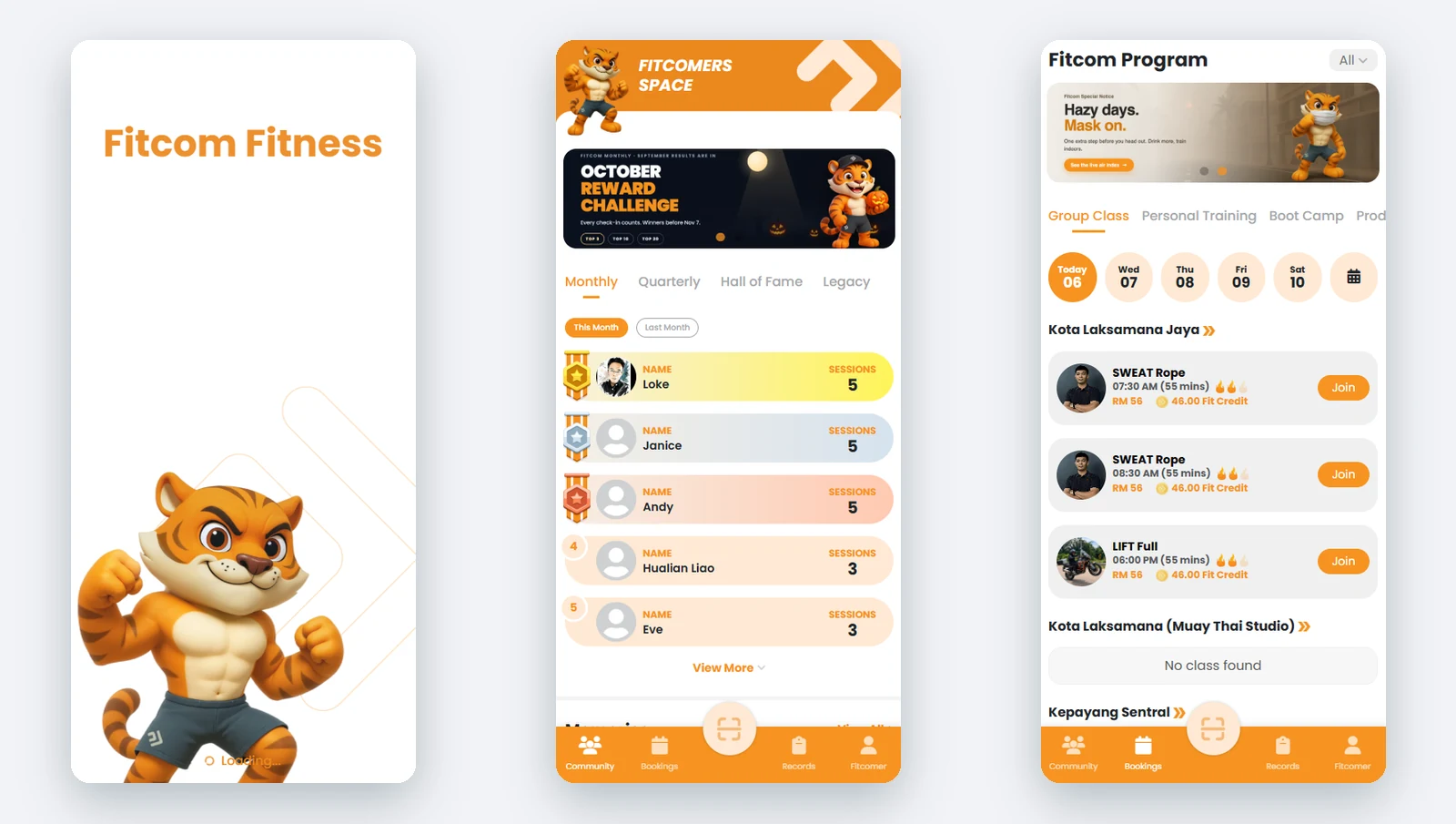
For Fitcom Fitness we built an online platform and mobile app where members book classes, follow trainer schedules, track their performance and progress through membership tiers. The gym’s team runs it all from the platform behind the app.
Booking page, web app or mobile app?
Many businesses start with a mobile-friendly booking website and add an installed app once members visit often enough to want one. We compare the options in native app, React Native or PWA.
Frequently asked questions
Can customers pay online when they book?
Yes. A booking system can be connected to a payment gateway so customers pay in full or leave a deposit by card, FPX or e-wallet when they book.
Can the system send reminders automatically?
Yes. Reminders can go out by push notification, email or SMS at times you choose. WhatsApp messages are possible through an approved WhatsApp Business messaging provider.
Can we import our existing member list?
Usually yes. Member names, contact details, packages and remaining sessions can be imported from spreadsheets during setup, so members do not have to register again.
Booking, membership, marketplace and customer-portal platforms with an admin panel for your team.

Managing Director and Software Solution Architect at Potadot, a web and system solutions company in Butterworth, Penang that builds custom ERP systems, online platforms, mobile apps and websites for businesses across Malaysia.
About Potadot